¶ Including a GitLab pipeline with templates from another pipeline
If we want to include a pipeline in another template we can do so in the .gitlab-ci.yml file with a few lines of code.
This is especially useful if you have multiple projects, which need to run the same CI/CD GitLab pipeline, but you don't want to change the code in every each of these projects. Having to change the .gitlab-ci.yml in each of these projects is time consuming and only offers opportunities for forgetting some projects or making copy paste errors.
This is where the use of templates comes in handy, if a template is used, only one file needs to be changed instead of e.g. 12 files in different projects.
¶ Prerequisites
- A functionig GitLab runner has to be present
¶ Example situation
As of right now I have 12 docker compose applications I deploy on my proxmox vms. To deploy the applications I user docker-compose.yaml files and I got the idea to update and start these docker compose files automatically.
At the start every project had a custom .gitlab-ci.yml, which deployed the docker compose application on the associated vm. After that I switched to triggering a downstream pipeline, like this one I explained in further detail in this wiki, to deploy these applications, but this also was ineffective, since the downstream pipelines is a seperated pipeline and all variables have to be explicitly copied over to be used. Another plus for the include method is that I don't have to copy over all my files I want to use for my playbooks, with a downstream pipeline I need to explicitly copy the docker-compose.yaml and inventory.yaml over to the new pipeline. This isn't needed with an included pipeline, since all files are already present, because it all stays in the same pipeline.
But everytime I changed the way the downstream pipeline accepts variables or works, I had to adjust every .gitlab-ci.yml one by one in every docker application project.
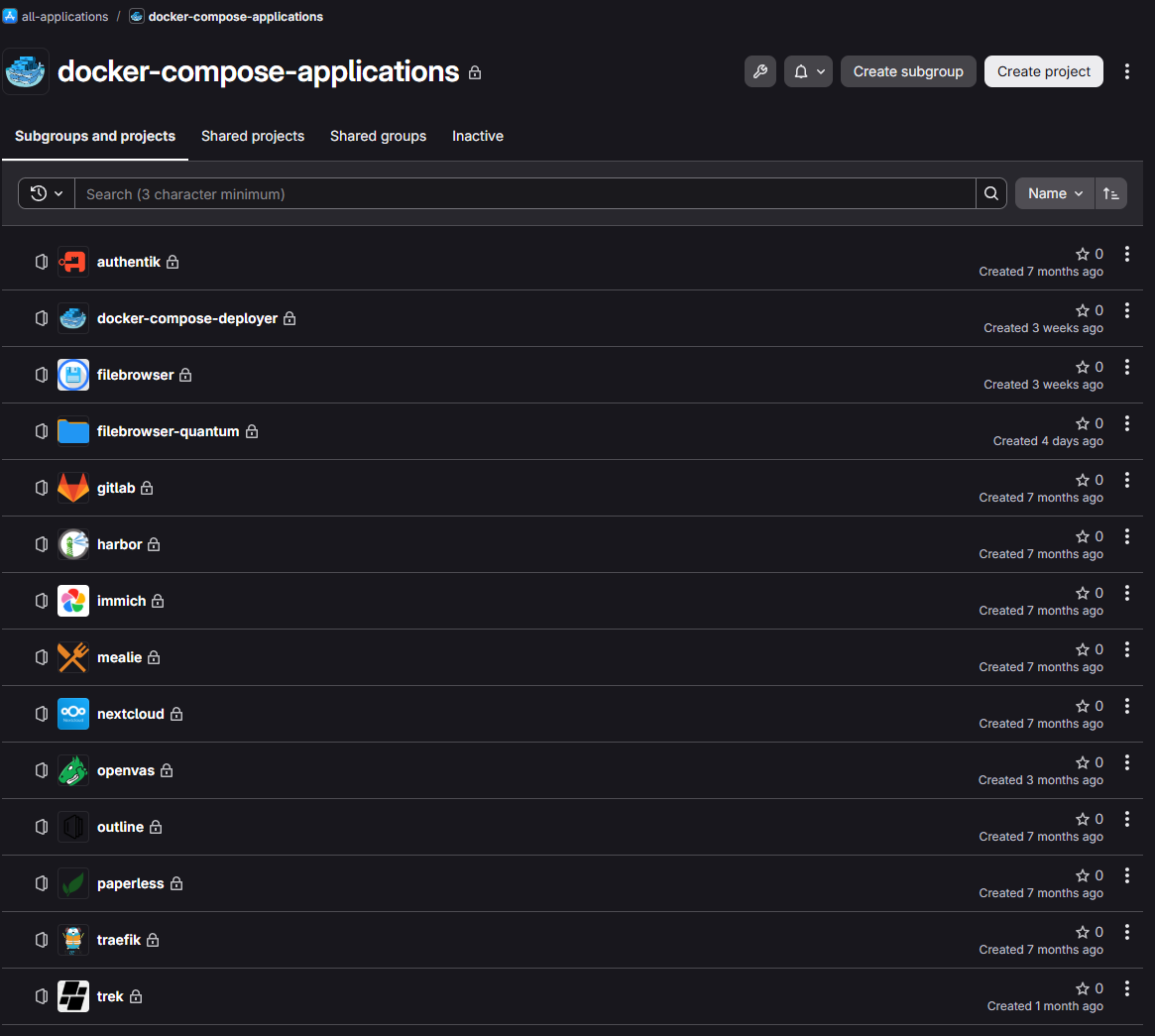
The solution for me was to include a .gitlab-ci.yml template from another project. This way I only have to change the code in one place and not in 12 different ones.
The dedicated project for this template got the name “docker-compose-deployer” and can be seen in the screenshot above.
¶ The starting pipeline
This is the .gitlab-ci.yml I use in every docker application project:
---
spec:
  inputs:
    DEPLOY:
      type: boolean
      default: false
      description: "Set to true if you want to push the new docker compose to the VM"
    DOWN:
      type: boolean
      default: false
      description: "Set to true if you want that the docker compose doesn't get started"
    ANSIBLE_VERBOSITY:
      type: number
      default: 0
      options: [0, 1, 2, 3, 4]
      description: "Sets the verbosity level of the Ansible playbooks triggered by this pipeline"

---
include:
  - project: 'all-applications/docker-compose-applications/docker-compose-deployer'
    file: 'templates/deploy-trigger.yaml'
    inputs:
      DEPLOY: $[[ inputs.DEPLOY ]]
      DOWN: $[[ inputs.DOWN ]]
      ANSIBLE_VERBOSITY: $[[ inputs.ANSIBLE_VERBOSITY ]]
...
I have 3 CI/CD inputs overall which control how the playbook runs and what it does. Here is the wiki article on how these CI/CD inputs work and how they are a real time and trouble saver when starting pipelines.
In the second section of the file we include a certain project and also specify a file / template to use. We also hand over the inputs to the included pipeline.
¶ The template / included pipeline
This is the template I use to start my playbook to copy the docker compose files to my vms and start them:
---
spec:
  inputs:
    DEPLOY:
      type: boolean
      default: false
      description: "Set to true if you want to push the new docker compose to the VM"
    DOWN:
      type: boolean
      default: false
      description: "Set to true if you want that the docker compose doesn't get started"
    ANSIBLE_VERBOSITY:
      type: number
      default: 0
      options: [0, 1, 2, 3, 4]
      description: "Sets the verbosity level of the Ansible playbooks"

---
stages:
  - linting
  - deployment

ansible-lint:
  image: harbor.johannesmauser.de:443/images-for-gitlab/custom-ansible-lint-image:latest
  stage: linting
  script:
    - ansible-lint --show-relpath

update-compose:
  image: harbor.johannesmauser.de:443/images-for-gitlab/ansible-baseimage:latest
  stage: deployment
  variables:
    DOWN: $[[ inputs.DEPLOY ]]
    ANSIBLE_VERBOSITY: $[[ inputs.ANSIBLE_VERBOSITY ]]
    DEPLOYER_PROJECT_PATH: "all-applications/docker-compose-applications/docker-compose-deployer"
  before_script:
    - >
      curl --fail --header "JOB-TOKEN: $CI_JOB_TOKEN"
      "${CI_API_V4_URL}/projects/$(echo $DEPLOYER_PROJECT_PATH | sed 's/\//%2F/g')/repository/files/playbook.yaml/raw?ref=main"
      -o playbook.yaml
    - eval $(ssh-agent -s)
    - echo $CICD_BASE64_SSH_PRIVATE_KEY | base64 -d | ssh-add -
    - echo "Das hier ist die Ansible Verbosity - $ANSIBLE_VERBOSITY"
    - echo "true = docker compose up - false = docker compose down - $DOCKER_COMPOSE_DOWN"
  script:
    - ansible-playbook playbook.yaml -i inventory.yaml
  rules:
    - if: '$CI_COMMIT_BRANCH == "main" && $[[ inputs.DEPLOY ]] == "true"'
...
The first stage is used to lint the yaml files, I use my custom Ansible linting image for this. Here is the link to my wiki article on creating custom images. The official one from dockerhub most times is sufficient.
The second stage includes 2 input variables which are used in my playbook.
In the before_script the playbook from the same project is downloaded with the curl command. Then the ssh connection is established.
Then the real script triggers the recently downloaded playbook with the inventory from the triggering docker compose project.
¶ CI/CD settings
!This only has to be done when your project is set to private, if it's set to internal or just public you can ignore this step!
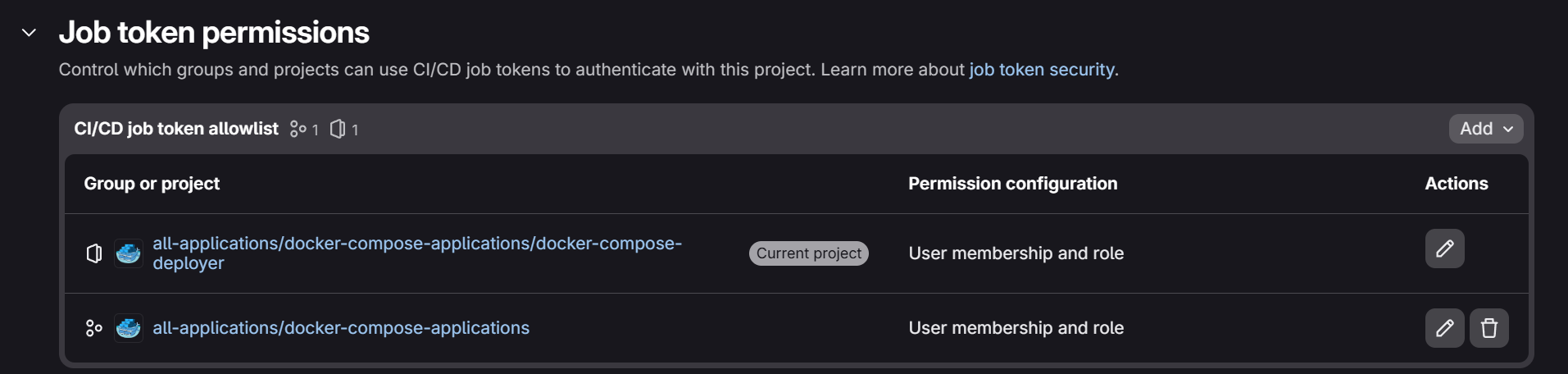
To be able to download the Ansible playbook, we have to change a setting in the CI/CD settings of the project where the template is located.
In this project, in my case it's the “docker-compose-deployer” project, please navigate to the CI/CD settings.
Then open the “Job token permissions” menu and add a new entry for the “CI/CD job token allowlist” with the name of the parent group where all the projects are located. An example can be seen in the second entry of the screenshot below.
¶ Final pipeline
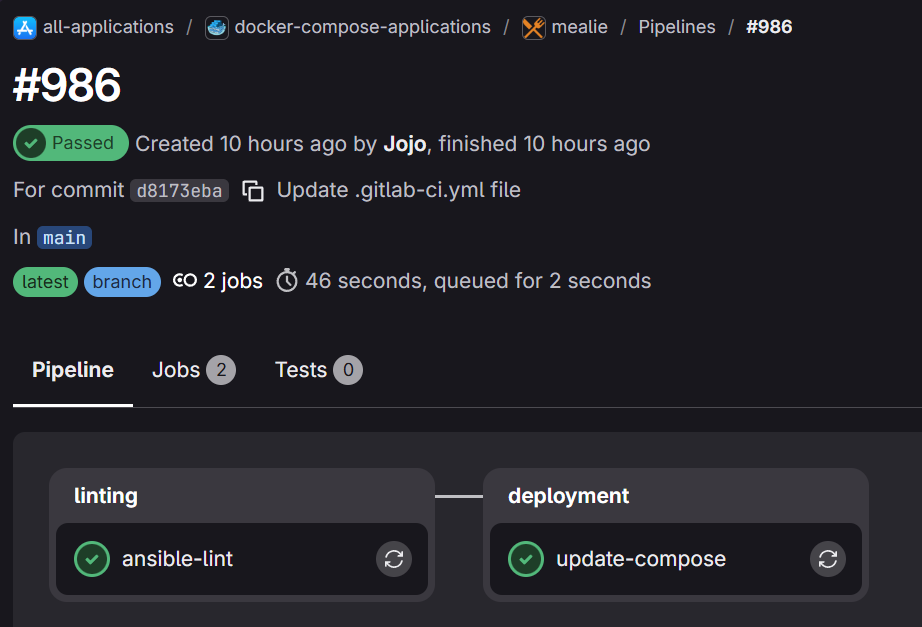
In the pipeline triggered from the docker compose project the looks like the following:
If you are interested to see how the playbook works in detail, head over to this wiki article about how I automatically update the docker-compose.yaml, restart the compose and wait for the service to be healthy. [COMING SOON]
¶ Debugging
- Please read the chapter “CI/CD settings” carefully if you have permission issues.